ALFA Wi-Fi Adapter Comparison
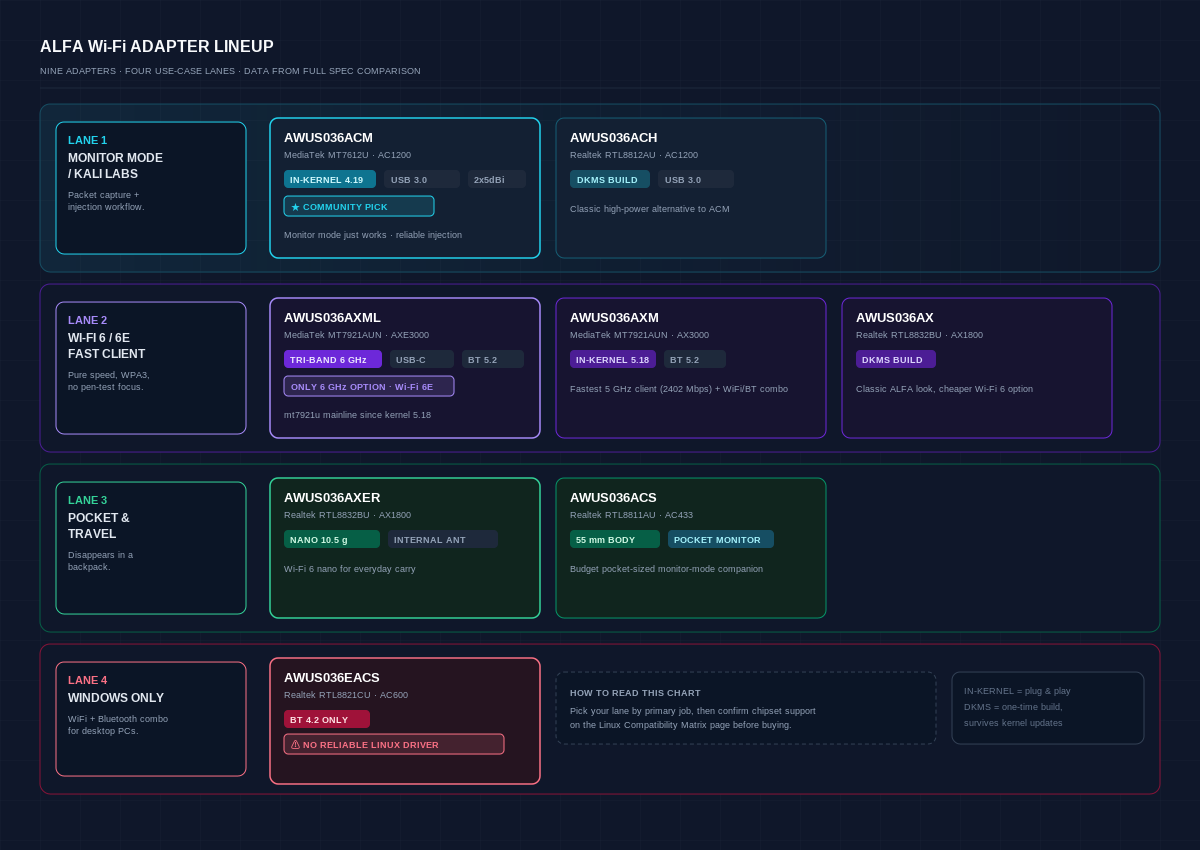
Bottom Line Up Front: If you are a university student using Kali Linux for coursework or lab exercises, buy the AWUS036ACM — its MediaTek MT7612U chipset is built into the Linux kernel, monitor mode and injection just work, and it costs less than the flagship models. (For the highest injection rates, the AWUS036EACS / AWUS036ACH / AWUS036ACS measured better, see below.) All nine adapters were tested on an ASUS GX10 (Ubuntu 24.04 ARM64, kernel 6.17) and work with in-kernel drivers (Realtek models need kernel 6.2+ for EACS, 6.13+ for ACH / ACS, 6.17+ for AX / AXER; older kernels need DKMS). Do not buy the AWUS036AXM / AXML for injection, deauth or handshake work — the MT7921 cards failed injection on the stock 6.17 kernel. If you need Wi-Fi 6E, the AWUS036AXML was verified on 6 GHz (the AXM shares the chip but 6 GHz was not tested on it). The AWUS036EACS is a WiFi + Bluetooth nano adapter that works in-kernel on Linux kernel 6.2+ (we did not test it on Windows).
💡 Click image to view in high-resolution full-screen lightbox.
The full spec comparison table
All nine adapters, one table. The monitor / injection column reflects our ASUS GX10 / Ubuntu 24.04 ARM64 tests (kernel 6.17.0-1014-nvidia, 2026-11-16 to 2026-11-19). "Monitor mode" means flipping the interface into RFMON so you can capture every packet on a channel — the fundamental requirement for Wireshark, Aircrack-ng, Wifite and similar tools.
| Model | Chipset | Wi-Fi class | Interface | Bands | Max speed | Monitor mode (Linux) | Antenna |
|---|---|---|---|---|---|---|---|
| AWUS036ACH | RTL8812AU | AC1200 | USB 3.0 | 2.4 + 5 GHz | 300 + 867 Mbps | ✅ monitor + injection 100 % on both bands (in-kernel rtw88_8812au, kernel ≥ 6.13; DKMS only on older kernels) | 2 × external 5 dBi, RP-SMA |
| AWUS036ACHM | MT7610U | AC600 | USB 2.0 | 2.4 + 5 GHz | 150 + 433 Mbps | ✅ monitor; injection 96–100 % on 2.4 GHz, 5 GHz broadcast only (in-kernel mt76x0u) | 1 × detachable 5 dBi, RP-SMA |
| AWUS036ACM | MT7612U | AC1200 | USB 3.0 | 2.4 + 5 GHz | 300 + 867 Mbps | ✅ monitor + injection (63–83 % on 2.4 GHz, 76 % on 5 GHz; in-kernel mt76x2u) | 2 × external 5 dBi, RP-SMA |
| AWUS036ACS | RTL8811AU | AC600 | USB 2.0 | 2.4 + 5 GHz | 150 + 433 Mbps | ✅ monitor + injection (100 % on 2.4 GHz, 96 % on 5 GHz; in-kernel rtw88_8821au, kernel ≥ 6.13) | 1 × external 2 dBi, RP-SMA (55 mm body) |
| AWUS036AX | RTL8832BU | AX1800 | USB 3.2 | 2.4 + 5 GHz | 574 + 1201 Mbps | ✅ strong monitor; injection 96 % on 2.4 GHz, works on 5 GHz (in-kernel rtw89_8852bu, kernel ≥ 6.17) | 2 × external 6 dBi, RP-SMA |
| AWUS036AXER | RTL8832BU | AX1800 | USB 3.2 | 2.4 + 5 GHz | 574 + 1201 Mbps | ✅ strong monitor; injection 73 % on 2.4 GHz, works on 5 GHz (in-kernel rtw89_8852bu, kernel ≥ 6.17) | Internal (10.5 g nano body) |
| AWUS036AXM | MT7921AUN | AX3000 class | USB 3.2 | 2.4 + 5 GHz tested (6 GHz not tested on the AXM) | up to 600 + 1200 + 1200 Mbps | 🟡 weak monitor; ❌ injection failed on stock 6.17 (in-kernel mt7921u) | 2 × external 5 dBi, RP-SMA + BT 5.2 |
| AWUS036AXML | MT7921AUN | AXE3000 | USB-C | 2.4 + 5 + 6 GHz (6 GHz verified) | up to 600 + 1200 + 1200 Mbps | 🟡 weak monitor; ❌ injection failed on stock 6.17 (in-kernel mt7921u) | 2 × external 5 dBi, RP-SMA + BT 5.2 |
| AWUS036EACS | RTL8821CU | AC600 | USB 2.0 | 2.4 + 5 GHz | 150 + 433 Mbps | ✅ monitor + injection 100 % on both bands (in-kernel rtw88_8821cu, kernel ≥ 6.2); BT works | Integrated 2 dBi + BT 4.2 |
Reading the speed numbers
The "+" splits the two bands: 2.4 GHz + 5 GHz (or + 6 GHz for the AXE models). A "300 + 867" adapter is AC1200 class: 300 Mbps is the 2.4 GHz ceiling (2 spatial streams × 150 Mbps), 867 Mbps is the 5 GHz ceiling (2 × 433 Mbps). Real-world throughput is typically 50–70 % of the link rate — physics, walls and USB bus overhead eat the rest.
Which one for you?
If you want Kali / monitor mode / packet injection → AWUS036ACM
The MT7612U chipset is in-kernel since Linux 4.19, which means: plug it in on any recent Kali or Ubuntu, and ip link already shows wlan0. Monitor mode works through the standard iw commands and packet injection works (63–83 % on 2.4 GHz and 76 % on 5 GHz in our test). It also offers 19–23 dBm TX power (about 100–200 mW, per ALFA's spec sheet) with two external antennas — genuinely useful range for lab exercises. If you want the highest injection rates, the AWUS036EACS / AWUS036ACH (100 % on both bands) and AWUS036ACS (100 % / 96 %) measured better on our GX10 and are in-kernel on a new enough kernel (EACS 6.2, ACH / ACS 6.13). The full workflow is on the Kali setup guide.
If you want Wi-Fi 6E (6 GHz) → AWUS036AXML
The AXML offers the 6 GHz band (AXE3000) and we verified it: a WPA3-SAE AP on ch37 / 6135 MHz, joined by an iPhone 15 Pro at 802.11ax. It uses the MediaTek MT7921AUN, whose mt7921u driver has been mainline since kernel 5.18 — so no DKMS pain — and it is a USB-C model with working Bluetooth. The AXM shares the chip, so 6 GHz is likely but was not tested on the AXM. Both are not suited to injection / deauth / handshake work (injection failed on stock kernel 6.17). See the Ubuntu setup guide.
If you want a pure client adapter (fast, stable, no pen-testing) → AWUS036AXM or AWUS036AX
The AXM is the faster-class of the two (AX3000, up to 1200 Mbps on 5 GHz per ALFA's spec) and adds Bluetooth 5.2 per the spec sheet — one dongle for WiFi + BT (Bluetooth was not tested on the AXM). The AX gives you Wi-Fi 6 + WPA3 with a more classic ALFA look and slightly lower price. On kernel 6.17+ the AX uses the in-kernel rtw89_8852bu driver and also passed monitor mode and injection in our tests. The AXM only receives weakly in monitor mode and failed injection, so it is a client/AP card, not a testing tool.
If you travel with a laptop / want a pocket adapter → AWUS036ACS or AWUS036AXER
The ACS (55 mm body) and the AXER (10.5 g, internal antenna) disappear in a backpack. The ACS is the budget monitor-mode companion (injection 100 % / 96 %); the AXER is the Wi-Fi 6 nano for everyday use and, in our hop scan, found 63 APs and 12 clients despite its internal antenna.
If you need WiFi + Bluetooth in one tiny stick → AWUS036EACS
The EACS (RTL8821CU) works on Linux kernel 6.2+ through the in-kernel rtw88_8821cu driver (we did not test Windows): in our tests it reached 100 % injection on both bands, passed AP/WPA3/handshake capture and its Bluetooth worked. The integrated 2 dBi antenna means short range, and after re-plugging the composite device may need a different USB port. On kernels older than 6.2 only an unstable community driver exists.
If you cannot decide — buy the ACM
The AWUS036ACM is the community consensus pick: in-kernel driver, monitor mode + injection verified on our GX10 tests, dual-band, high power, and well within a student budget. You will find it referenced all over the troubleshooting and driver pages as the "boring, reliable option" — and in this world, boring means it just works.
Next: check your OS in the compatibility matrix, or dive straight into the Ubuntu / Kali setup guides.